
While integrating LSASS dumping techniques into SpecterInsight’s dumper module, I used Offensive-Panda’s ShadowDumper as a reference point. That tool is great collection of LSASS dump techniques, but I also wanted to improve upon their research by addressing some of the issues that might result in detection by an EDR:
- Every technique writes a recognizable file to a hardcoded path.
- The encryption is effectively a single-byte, hard coded XOR.
- The callback technique collects the dump in memory but then immediately writes it to disk.
- The native dump variant still loads
dbghelp.dllwhich may stand out.
The rest of this post walks through the changes I made and why.
The Callbacks Technique: Dump Stays in Memory
Probably the biggest improvement I wanted to make was to add an option to generate a mini dump without touching disk. ShadowDumper uses the callbacksMDWD function returns S_FALSE from IoStartCallback, which tells dbghelp to route all write operations through IoWriteAllCallback instead of writing to the file handle. The dump is intercepted entirely in the callback which is great because that keeps the signaturized dumps in-memory. But since ShadowDumper is a standalone tool, it has to write everything to disk:
// callbacksMDWD.cpp
std::string dumpFileName = "C:\\Users\\Public\\callback.elf";
dumpFile = CreateFileA(dumpFileName.c_str(), GENERIC_ALL, 0, NULL,
    CREATE_ALWAYS, FILE_ATTRIBUTE_NORMAL, NULL);
WriteFile(dumpFile, dBuff, bReadd, &bytesWritten, NULL);
After collecting all the dump bytes in dBuff via the callback, the original writes them back to C:\Users\Public\callback.elf using FILE_ATTRIBUTE_NORMAL. The dump lands on disk. The S_FALSE trick kept it out of the file that was passed to MiniDumpWriteDump, but then the code writes it out again manually. The end result is the same: an unobfuscated MDMP file at a predictable path.
One of the advantages of an integrated C2 is that I can exfiltrate the dump straight back to the C2 server and avoid the disk entirely. In SpecterInsight, IoWriteAllCallback writes into a managed List<byte> and that is where the dump lives. There is no second write to disk. The List<byte> is returned as a byte[] to the export layer which decides what to do with it: write it to a user-specified path with transforms applied, or hold it in memory for in-process parsing.
I did run into one weird issue. The Windows 10 dev system I was using rejected a null hFile argument to MiniDumpWriteDump even when all I/O is going through callbacks. To satisfy that validation, I provided a throwaway file handle created with FILE_ATTRIBUTE_TEMPORARY | FILE_FLAG_DELETE_ON_CLOSE to ensure it doesn’t write to disk.
IntPtr hThrowaway = NativeMethods.CreateFileW(throwawayPath, GENERIC_WRITE, 0,
    IntPtr.Zero, CREATE_ALWAYS,
    FILE_ATTRIBUTE_TEMPORARY | FILE_FLAG_DELETE_ON_CLOSE, IntPtr.Zero);
Because IoStartCallback returns S_FALSE, dbghelp never writes anything to this handle. The file on disk is zero bytes. FILE_FLAG_DELETE_ON_CLOSE removes it the moment the handle closes in the finally block. The entire MDMP lives in the managed buffer.
The original also pre-allocates a fixed 75MB static heap buffer for the callback to write into:
// Header.h
LPVOID dBuff = HeapAlloc(GetProcessHeap(), HEAP_ZERO_MEMORY, 1024 * 1024 * 75);
LSASS dumps on systems with more than a handful of active user sessions routinely exceed 75MB. The original will silently overflow or truncate. SpecterInsight uses a List<byte> that grows dynamically. The callback handles out-of-order writes by filling to the required size before writing each chunk at its declared offset, since IoWriteAllCallback does not guarantee sequential delivery.
Syscalls Using On-Disk NTDLL.dll
The original uses SysWhispers3-generated stubs (Sw3NtOpenProcess, Sw3NtReadVirtualMemory, etc.). SysWhispers3 resolves syscall numbers by scanning the in-memory ntdll.dll image in the current process at runtime, the same image that EDR products patch.
If an EDR has replaced the first byte of an Nt* stub with a JMP to a hook function (the standard inline hook pattern), SysWhispers3’s runtime resolver reads that instruction. Depending on the SysWhispers3 variant in use, it either detects the hook and falls back to an alternative strategy, or it misreads the displaced bytes as a syscall number and invokes the wrong call, which typically crashes.
I chose to resolve syscall numbers from the clean, on-disk copy of ntdll.dll instead. I map the file into memory via CreateFileMappingW and MapViewOfFile, and then I scan for Syscalls directly. Each function’s prologue in the on-disk image should be the original, unhooked version:
// Skip if the in-memory stub has been trampolined
byte firstByte = Marshal.ReadByte(pFunc, 0);
if (firstByte != 0x4C) continue;  // hooked stubs have 0xE9 (JMP) here
// Read syscall number from offset 4 (mov eax, <number>)
uint syscallNumber = (uint)Marshal.ReadInt32(pFunc, 4);
The 11-byte stub that issues the actual syscall instruction is allocated in RWX memory and the resolved number is patched in at offset 4:
4C 8B D1              mov r10, rcx
B8 xx xx xx xx        mov eax, <syscall number>   ← patched at construction
0F 05                 syscall
C3                    ret
This matches the common x64 Nt* stub layout used by unhooked ntdll exports on the Windows builds I tested. The call goes directly to the kernel without passing through the monitored code paths.
The Native Technique: Removing dbghelp.dll
The original syscallsNative function calls SymInitializeW and EnumerateLoadedModulesW64 to build the module list:
// syscallsNative.cpp
if (!(sym_initialized = SymInitializeW(hProcess, NULL, TRUE))) { ... }
// ...
fetch_modules_info(&dc);  // calls EnumerateLoadedModulesW64
Both of those functions are in dbghelp.dll. The entire point of a native dump implementation, building the MDMP by hand without calling MiniDumpWriteDump, is to remove the dependency on dbghelp.dll. Loading dbghelp.dll into a process that also has a handle to LSASS open is itself a high-confidence indicator. The original’s native technique loads it anyway to enumerate modules, which defeats much of the benefit.
I chose to implement the NativeDumper technique using Syscalls VirtualQueryEx and NtReadVirtualMemory to builds all three required streams (SystemInfoStream, ModuleListStream, Memory64ListStream). Module information comes from reading the PEB and walking the loader data table through NtReadVirtualMemory rather than through dbghelp. By acquiring the information I needed through direct means, I never need to load dbghelp.dll.
Dynamic Encryption Keys and Compression
I wanted the transform layer to solve three practical problems: avoid a static key, preserve the key needed for recovery, and reduce transfer size before exfiltration.
The original’s encryption is a byte-by-byte XOR applied twice in sequence:
// decrypt.cpp
buffer[i] = buffer[i] ^ 0x9A1C;
buffer[i] = buffer[i] ^ 0x5B9C;
Since both values are 16-bit but are XORed against a BYTE, only the low bytes apply: 0x1C ^ 0x9C = 0x80. The two operations collapse to a single-byte XOR with the constant 0x80. Every byte in the dump is transformed by the same value, which is still signaturizable by anyone who has read the PoC source, and which leaves the first four bytes of the file as 0xCD 0xC4 0xCD 0xD0, a different set of bytes than the MDMP magic but not random noise.
SpecterInsight applies two transforms in order. First, GZip compression which significantly reduces the size of the dump output.
// GZip pass: destroys MDMP magic (0x4D 0x44 0x4D 0x50),
// replaces first bytes with GZip magic (0x1F 0x8B)
GZipStream gz = new GZipStream(outputStream, CompressionMode.Compress);
gz.Write(data, 0, data.Length);
Then the compressed dump is XOR’d with a randomly generated key applied one DWORD at a time:
uint mask = ((uint)key1 << 16) | key2;
for (int i = 0; i < dwordCount; i++) {
    uint dword = BitConverter.ToUInt32(data, i * 4);
    dword ^= mask;
    // write back
}
The GZip pass reduces the output files size and the XOR pass obfuscates the GZip signature. The key is randomly generated per run, not hardcoded. The final artifact no longer begins with a recognizable MDMP or GZip header, and it cannot be decoded without the generated key. This directly mitigated one signature in Windows Defender.
Hardcoded Output Paths
I also wanted to give operators the flexibility to specify where the dump file will go. Every technique in the original writes to a path under C:\Users\Public\:
// callbacksMDWD.cpp
"C:\\Users\\Public\\callback.elf"
// forkdump.cpp
"C:\\Users\\Public\\panda.raw"
// syscallsMDWD.cpph
_stprintf_s(szFileName, MAX_PATH, _T("C:\\Users\\Public\\sysMDWD.file"));
// syscallsNative.cpp
LPCSTR output_file = "C:\\Users\\Public\\panda.sense";
C:\Users\Public\ isn’t necessarily bad… it might stand out as there probably won’t be that many writes to that location. But again, any hardcoded parameters become signatures very quickly.
The new SpecterScript takes a caller-supplied output path as a parameter so that there is no hardcoded location, though there is a randomly generated filename for the default.
Extracting Credentials From the Dump In-Memory On Target
LSASS dumps can be fairly large (at least 75MB) and exfiltrating them can pose risk to detection. The less network bandwidth I use, the less I stand out. Since the dumper module is designed to run within the SpecterInsight implant, I figured I might as well parse them on target versus pulling the entire memory dump back to my ops VM.
To do that, I basically just needed to implement Mimikatz’s template logic that leverages OS version and architecture-specific structure offsets and byte signatures to find key data structures. Those were written and designed to be extracted using live memory, so before we can implement that we first had to extract the mini dump file format so that we could clearly map all of the pointers in the image to the relative virtual addresses in the mini dump file.
We broke all of that down into a three step process:
- Parse the Minidump
- Perform Memory Address Translation
- LSA Key Extraction
1. Minidump Parsing
The dump bytes are read as a standard Windows minidump (.dmp / MDMP format). MinidumpHeader validates the signature and directory RVA, then MinidumpDirectory dispatches streams — module list, system info, and memory descriptor lists — into an ExtractionContext that holds the parsed state for the rest of the pipeline.
2. Memory Address Translation
All virtual addresses from LSASS structures must be converted to file offsets within the dump. ExtractionHelpers.Rva2offset() does this by searching the memory segment table parsed from the Memory64ListStream / MemoryListStream. GetPtrWithOffsetResolved() handles x64 RIP-relative pointer fixups.
3. LSA Key Extraction
Before any credentials can be read, LsaKeyExtractor locates lsasrv.dll in the module list, pattern-scans its memory region using architecture/OS-specific signatures from LsaTemplateNT6 (covering Vista through Win10 1809+, x86 and x64), and reads the KIWI_BCRYPT_KEY81 structure to extract:
- IV — 16-byte AES initialization vector
- AES key — for credentials whose length % 8 ≠ 0 (AES-CFB mode)
- DES key — for 8-byte-aligned credentials (3DES-CBC mode)
LsaBCrypt.DecryptCredentials() applies the correct algorithm path based on ciphertext length.
4. Logon Session Discovery
LogonSessionFinder pattern-scans lsasrv.dll for the KIWI_MSV1_0_LIST_* structure, reads the linked-list head and session count, then walks the list to extract each session’s LUID, logon type, username, domain, server, and SID. KerberosSessionFinder does the same for the AVL tree in kerberos.dll.
5. Per-SSP Credential Finders
Each credential package has a dedicated finder that:
- Pattern-scans the owning DLL’s memory for a known signature (structure-specific per OS version, from the template classes)
- Walks the package’s native data structure (circular linked list, AVL tree, etc.)
- Reads
UNICODE_STRINGdescriptors for username/domain/password fields - Calls
LsaBCrypt.DecryptCredentials()to decrypt the ciphertext in-place - Computes the NT hash via the managed
LsaMD4(MD4 of UTF-16LE plaintext) when a cleartext password was obtained
Packages covered: MSV1_0 (NT/LM/SHA1/DPAPI), WDigest (cleartext), Kerberos, TSpkg (Terminal Services), SSP, LiveSSP, CredMan, CloudAP (Azure AD / PRT), DPAPI master keys, and RDP.
Output
All finders write into the shared ExtractionContext.LogonSessions list, keyed by LUID, so each session aggregates credentials from all packages into a single LogonSession object.
Using the dumper Module in SpecterInsight
After building the module, I exposed the dumper module features as a SpecterScript to make these techniques discoverable and easy to execute. Because SpecterInsight needs to emulate adversaries at various levels from basic to advanced, I chose to expose options to dump LSASS in plaintext straight to disk. While that is not great tradecraft, it does help test or validate techniques that should be detected. I did take the liberty of provided more stealthy options by default.
param(
    [Parameter(Mandatory = $true, Position = 0, HelpMessage = "Technique to use when capturing the lsass memory dump.")]
    [ValidateSet("Mimikatz", "UnhookSyscalls", "Simple", "Callbacks", "Fork", "Syscalls", "Native", "Stealth")]
    [string]$Technique = 'Native',
    [Parameter(Mandatory = $false, Position = 1, HelpMessage = "Destination file path for the dump. Omit to use the technique-specific default under C:\Users\Public. Not applicable to Mimikatz or UnhookSyscalls.")]
    [ValidateNotNullOrEmpty()]
    [string]$OutputPath,
    [Parameter(Mandatory = $false, HelpMessage = "XOR-encrypt the dump before writing to disk. Supported by Callbacks and Fork only.")]
    [bool]$Encrypt = $false,
    [Parameter(Mandatory = $false, HelpMessage = "GZip-compress the dump before writing to disk. Can be combined with -Encrypt.")]
    [bool]$Compress = $false
)
load dumper;
$params = @{ Technique = $Technique };
if ($OutputPath) { $params['OutputPath'] = $OutputPath; }
if ($Encrypt)    { $params['Encrypt']    = $true; }
if ($Compress)   { $params['Compress']   = $true; }
New-ShadowDump @params;
The SpecterScript above renders as a nice UI like the one below with a drop down menu for the available techniques. Here I am configuring the fork technique. I’ve listed the files in the C:\Windows\Temp\ directory so that I can choose a filename that blends in. There is also an option to encrypt the dump file for better OPSEC. Here I am going to just do a simple dump to disk with no compression or encryption with Windows Defender active, fully expecting this to be caught.

As expected, Windows Defender alerts on the dump file itself with the Trojan:Win32/LsassDump.A signature. Based on the alert below and the fact that it alerted on the filepath, I suspect the alert is for a memory structure within the Lsass dump itself, which is where the encryption and compression can help.

Memory Only Lsass Dump
Now that I’ve demonstrated how the original technique gets caught, let’s take a look at the modified technique that compresses and encrypts the dump. Here I’m going to select the Syscall technique, which is basically the same as the one we just ran except it uses direct system calls. That probably won’t affect Windows Defender too much, but it might affect EDRs that use user-mode API call hooking for telemetry. The bigger change is that I left the Encrypt and Compress toggles on. This essentially tells the module to use the in-memory dumping technique and then compress and encrypt the file (in that order).

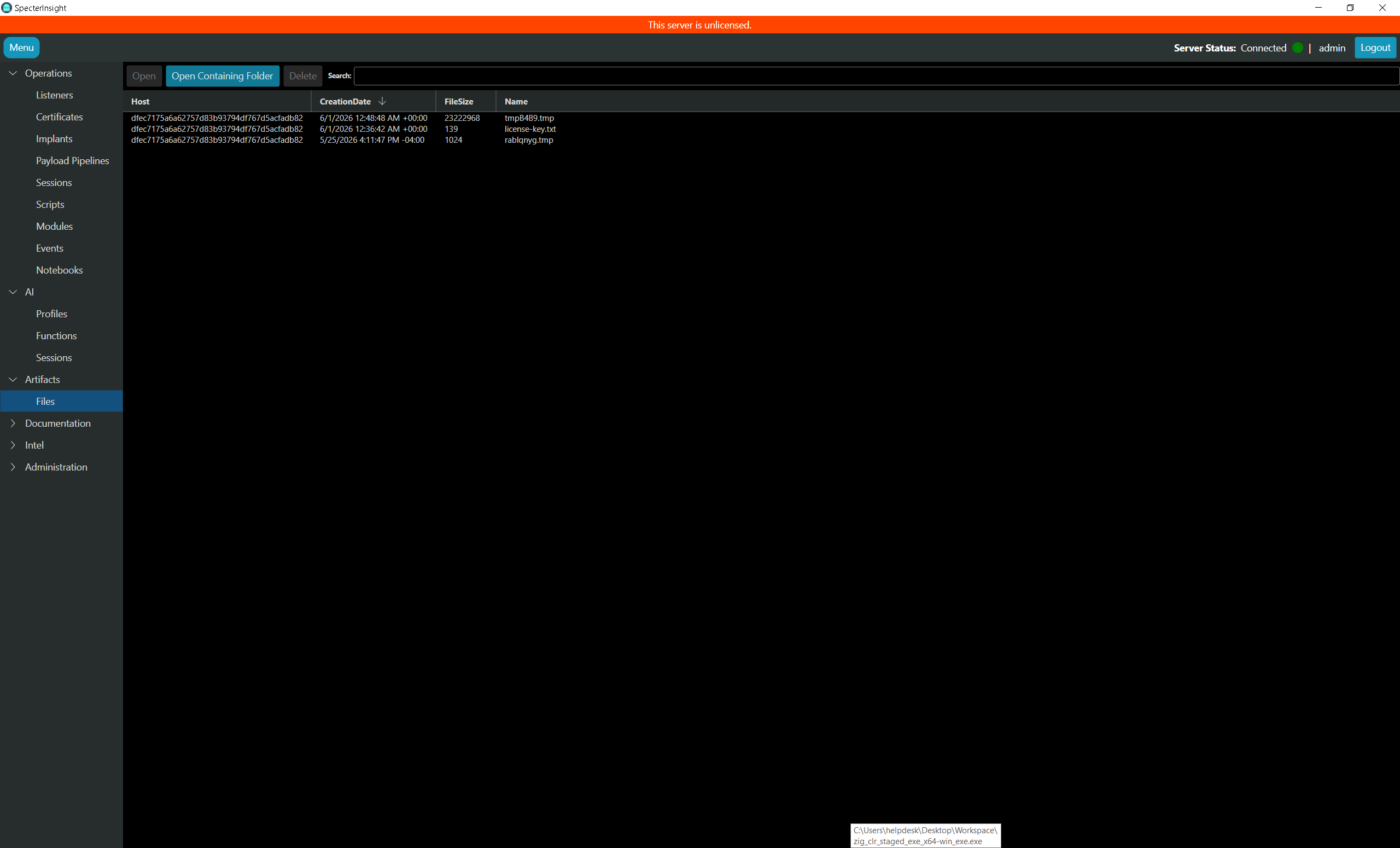
The task succeeded without tripping Windows Defender, but we still have to exfiltrate the file back to my ops VM. For that, I just use the Exfiltrate File SpecterScript.

That successfully pulls the memory dump back and saves it in the artifacts page.
Extracting Credentials From Memory
Here is the output of dumping credentials and extracting them in-memory. This is a nice option because it keeps potentially signaturized LSASS dumps off disk and it doesn’t require shipping back the 75MB dump file.

This is basically just Mimikatz with a non-detected memory extraction technique but it works.
Conclusion
I have presented some Lsass dumping improvements that I incorporated into SpecterInsight’s dumper module. The key change was modifying the callback technique to keep the dump in memory using the temp file technique (FILE_ATTRIBUTE_TEMPORARY | FILE_FLAG_DELETE_ON_CLOSE). Syscall numbers are resolved from the clean on-disk ntdll rather than the potentially hooked in-memory image. Lastly, the I added GZip compression followed by XOR encryption to mitigate AV signatures.
Those additions yielded a much more OPSEC friendly way to do Lsass memory dumps in SpecterInsight.

